


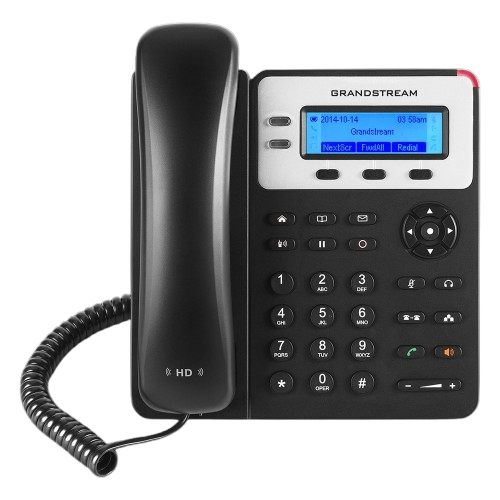
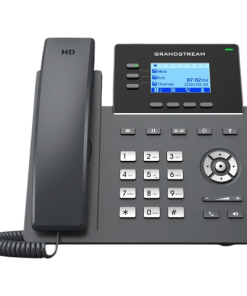
Grandstream GXP1625 VoIP Small Business IP Phone
KSh7,000.0
- Model: Grandstream GXP1625
- Phone Type: VoIP IP Phone
- SIP Accounts: 2
- Lines: 2
- Display: 132 x 48 Backlit Graphical LCD
- Audio: HD Handset and HD Speakerphone
- Ethernet Ports: Dual 10/100 Mbps Switched Ports
- Power over Ethernet: Yes (PoE Supported)
- Conferencing: 3-Way Audio Conferencing
- Headset Port: RJ9
- Programmable Soft Keys: 3 XML Programmable Keys
- Phonebook Capacity: Up to 1,000 Contacts
- Call History: Up to 200 Records
Grandstream GXP1625 VoIP Small Business IP Phone
Grandstream GXP1625 VoIP Small Business IP Phone is an affordable and feature-rich communication solution designed for small businesses, startups, and home offices. With support for 2 SIP accounts, HD audio technology, integrated Power over Ethernet (PoE), and advanced call management features, the GXP1625 delivers reliable and professional voice communications. Its intuitive interface, enterprise-grade security, and easy deployment capabilities make it an excellent choice for organizations seeking a dependable IP phone for daily business operations.
Product Features
HD Audio for Crystal-Clear Voice Communication
The GXP1625 features HD audio on both the handset and full-duplex speakerphone, ensuring exceptional voice clarity for business calls. The enhanced audio quality helps reduce misunderstandings and improves communication efficiency.
Support for 2 SIP Accounts and 2 Lines
With support for up to two SIP accounts and two line appearances, users can efficiently manage multiple calls and business extensions from a single device.
Integrated Power over Ethernet (PoE)
The built-in PoE capability allows the phone to receive power and network connectivity through a single Ethernet cable, simplifying installation and reducing cable clutter in the workplace.
Backlit LCD Display
The 132 x 48 pixel graphical LCD display features backlighting for improved visibility. Users can easily access call information, contacts, and phone settings even in low-light environments.
3-Way Audio Conferencing
The GXP1625 supports 3-way audio conferencing, enabling teams to collaborate effectively without requiring additional conferencing hardware or services.
Dual Switched Ethernet Ports
Equipped with dual 10/100 Mbps Ethernet ports, the phone allows convenient network connectivity and supports deployment in various office network environments.
Programmable Soft Keys
Three XML programmable soft keys provide quick access to frequently used functions, enhancing productivity and streamlining daily communication tasks.
Enterprise-Level Security Protection
The phone incorporates advanced security features including TLS, SRTP encryption, HTTPS provisioning, and 802.1x network access control to help safeguard voice communications and device configurations.
Simplified Provisioning and Management
Support for automated provisioning through TR-069, HTTP, HTTPS, TFTP, and encrypted XML configuration files enables efficient deployment and centralized management across organizations.
Product Specifications
- Model: Grandstream GXP1625
- Phone Type: VoIP IP Phone
- SIP Accounts: 2
- Lines: 2
- Display: 132 x 48 Backlit Graphical LCD
- Audio: HD Handset and HD Speakerphone
- Ethernet Ports: Dual 10/100 Mbps Switched Ports
- Power over Ethernet: Yes (PoE Supported)
- Conferencing: 3-Way Audio Conferencing
- Headset Port: RJ9
- Programmable Soft Keys: 3 XML Programmable Keys
- Phonebook Capacity: Up to 1,000 Contacts
- Call History: Up to 200 Records
- Voice Codecs: G.711, G.722, G.723, G.726, G.729A/B, iLBC
- Security Features: TLS, SRTP, HTTPS, AES Encryption, 802.1x
- QoS Support: Layer 2 and Layer 3 QoS
- Network Protocols: SIP, TCP/IP, UDP, RTP, RTCP, DHCP, HTTP, HTTPS, LDAP, TR-069
- Wall Mountable: Yes
- Power Supply: 5V DC Adapter (Optional when using PoE)
- Maximum Power Consumption: Approximately 2.0W
- Dimensions: 209 x 184.5 x 76.2 mm
- Weight: Approximately 0.74 kg
- Operating Temperature: 0°C to 40°C
- Storage Temperature: -10°C to 60°C
How to Get and Setup It
If you want to start using it or configure it:
- Connection: Connect an Ethernet cable from the phone’s ‘Internet port’ to your switch or router. If your switch does not have PoE, you will also need to connect its wall charger (power adapter).
- Getting the IP Address: Press the Next Scr button on the phone to see its ‘IP Address’ at the top of the screen.
- Logging Into the System (Web UI): Type the IP address in the browser of your computer that is on the same network as the phone. The default username and password are admin and admin.
- Factory Reset: If the phone has been used before, you can restore it to factory settings by pressing MENU -> System -> Factory Reset then confirm by pressing OK.
Be the first to review “Grandstream GXP1625 VoIP Small Business IP Phone”
Related products

Grandstream IP Phones
Grandstream IP Phones

Grandstream IP Phones

Grandstream IP Phones
Grandstream IP Phones

Grandstream IP Phones
Grandstream IP Phones
Grandstream IP Phones
Reviews
There are no reviews yet.