
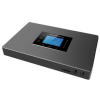

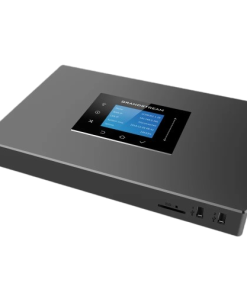
Grandstream UCM6302A IP PBX (Audio Only)
KSh45,000.0
- Model: Grandstream UCM6302A
- Product Type: Audio-Only IP PBX
- Maximum Users: 500
- Maximum Concurrent Calls: 75
- Maximum Concurrent SRTP Calls: 75
- Voice Conference Capacity: Up to 75 Participants
- Conference Rooms: Up to 5 Meeting Rooms
- FXO Ports: 2 × RJ11
- FXS Ports: 2 × RJ11
- Network Interfaces: 3 × Gigabit RJ45 Ports with PoE+
- NAT Router Support: Yes
- USB Ports: 1 × USB 2.0, 1 × USB 3.0
- Storage Expansion: 1 × SD Card Slot
- Display: 320 × 240 Color Touchscreen LCD
- Voice Codec Support: Opus, G.711 A-law/U-law, G.722, G.723.1, G.726-32, G.729A/B, iLBC, GSM
- Fax Support: T.38
- Security Protocols: TLS, SRTP, HTTPS, SSH
- API Integration: CRM and PMS Platforms
- Cloud Management: GDMS Compatible
Grandstream UCM6302A IP PBX (Audio Only)
Grandstream UCM6302A IP PBX is a powerful audio-focused unified communications platform designed for small and medium-sized businesses that require reliable voice communication, conferencing, mobility, and collaboration tools. Supporting up to 500 users and 75 concurrent calls, the UCM6302A combines enterprise-grade telephony features, analog line integration, instant messaging, audio conferencing, remote connectivity, and advanced security into a single on-premises solution. With built-in support for the Wave application, cloud management, and third-party integrations, this IP PBX helps organizations streamline communication while maintaining complete control over their business phone system.
Product Features
Supports Up to 500 Users and 75 Concurrent Calls
The UCM6302A is designed to support growing businesses with up to 500 registered users and 75 simultaneous calls, making it suitable for offices, schools, healthcare facilities, hotels, and multi-branch organizations.
Integrated Audio Unified Communications Platform
This audio-only IP PBX provides voice calling, instant messaging, audio conferencing, web meetings, mobility services, facility access integration, intercom support, and collaboration tools within a centralized communication platform.
Dual FXO and FXS Connectivity
The system includes two FXO ports and two FXS ports, allowing seamless integration with traditional PSTN lines, analog telephones, and fax machines while supporting migration to modern IP communications.
Built-In Conferencing and Collaboration
The UCM6302A features an integrated conferencing platform that supports voice meetings and web collaboration from SIP phones, desktop computers, web browsers, and mobile devices without requiring additional conferencing solutions.
Free Wave Application for Remote Communication
Grandstream’s Wave application enables users to make and receive calls, send instant messages, and join meetings from Windows, macOS, Android, iOS, and web browsers, supporting hybrid and remote work environments.
Zero-Touch Device Provisioning
Automatic provisioning of Grandstream SIP endpoints simplifies deployment, reduces configuration time, and streamlines administration for IT teams managing multiple devices.
Advanced Security and Encryption
Enterprise-grade security features include secure boot, unique device certificates, encrypted communications, random default passwords, SRTP, TLS, HTTPS, and other protection mechanisms that safeguard business communications and user accounts.
High-Speed Gigabit Networking
Three Gigabit Ethernet ports with integrated PoE+ support deliver reliable connectivity, flexible network deployment, and NAT router functionality for efficient communication management.
Cloud Management and Remote Access
The UCM6302A supports GDMS cloud management and UCM RemoteConnect services, enabling centralized deployment, monitoring, maintenance, and secure remote access from anywhere.
Open API for Business Integration
An open API allows integration with CRM systems, property management systems (PMS), and other business applications, helping organizations improve workflow automation and customer service.
Built on Asterisk Technology
Powered by the Asterisk Version 16 telephony platform, the UCM6302A delivers enterprise-level call management, flexibility, and compatibility with SIP-based devices and services.
Product Specifications
- Model: Grandstream UCM6302A
- Product Type: Audio-Only IP PBX
- Maximum Users: 500
- Maximum Concurrent Calls: 75
- Maximum Concurrent SRTP Calls: 75
- Voice Conference Capacity: Up to 75 Participants
- Conference Rooms: Up to 5 Meeting Rooms
- FXO Ports: 2 × RJ11
- FXS Ports: 2 × RJ11
- Network Interfaces: 3 × Gigabit RJ45 Ports with PoE+
- NAT Router Support: Yes
- USB Ports: 1 × USB 2.0, 1 × USB 3.0
- Storage Expansion: 1 × SD Card Slot
- Display: 320 × 240 Color Touchscreen LCD
- Voice Codec Support: Opus, G.711 A-law/U-law, G.722, G.723.1, G.726-32, G.729A/B, iLBC, GSM
- Fax Support: T.38
- Security Protocols: TLS, SRTP, HTTPS, SSH
- API Integration: CRM and PMS Platforms
- Cloud Management: GDMS Compatible
- Remote Connectivity: UCM RemoteConnect
- Operating Platform: Asterisk Version 16
- Provisioning: Zero-Touch Auto Provisioning
- Mounting Options: Desktop and Wall Mount
- Power Supply Input: 100–240V AC, 50/60Hz
- Power Supply Output: 12V DC, 1.5A
- Operating Temperature: 0°C to 45°C
- Storage Temperature: -10°C to 60°C
- Dimensions: 270 × 175 × 36 mm
- Weight: Approximately 0.72 kg
- Ideal For: Small and Medium Businesses, Hotels, Educational Institutions, Healthcare Facilities, and Multi-Site Organizations
Core Business Benefits
- Zero Licensing Fees: Full access to all enterprise features, software upgrades, and configurations without recurring costs.
- Hybrid Remote Ecosystem: Pairable with the Grandstream Wave App (available for iOS, Android, web, and desktop) and the UCM Remote Connect Cloud Service to provide secure, cloud-based NAT firewall traversal for out-of-office workers
- Centralized Management: Seamlessly cloud-provisioned and monitored using the free Grandstream Device Management System (GDMS).
- Enterprise Security: Outfitted with robust system protections including secure boot, unique security certificates, and random default passwords alongside TLS/SRTP encryption.
Step-by-step initial setup and provisioning
Step 1: Connecting the Wires (Hardware Connection)
- Power: Connect the power adapter to the device and plug it into a power outlet. (If your switch supports PoE+, you can use just the network cable.)
- Network: Connect the Ethernet cable from your switch/router to the WAN port of the UCM6302A.
- Standard Phones (FXS/FXO):
- Connect regular landline telephone lines (PSTN) to FXO ports .
- Connect regular analog phones or fax machines to the FXS ports (if available).
Step 2: Obtaining the IP Address
- Look at the LCD screen located on the front of the UCM6302A.
- Press the Back/Menu button to turn on the mirror and see the IP address (for example: 192.168.1.100).
Step 3: Login to the System (Web GUI Login)
- Open a browser on a computer that is on the same network as UCM.
- Type that IP address in the URL field (use https://, for example: https://192.168.1.100:8089).
- Enter your username ( Username ): admin.
- Enter password : The unique factory password is found on a sticker affixed to the bottom of the UCM6302A device.
- The system will prompt you to change your password the first time you log in.
Step 4: Configuring the System for the First Time (Setup Wizard)
After logging in, the system will automatically open the “Setup Wizard” to guide you:
- Network Settings: Choose whether you want a fixed IP (Static IP) or automatic (DHCP). It is recommended to use Static IP for IP PBX.
- Time Zone: Select the appropriate time zone (example: Africa/Nairobi ).
- Extensions: The system will allow you to easily create multiple internal phone numbers (Extensions).
Step 5: Phone Provisioning and Registration (Phone Provisioning via GDMS)
A simple and modern way to configure Grandstream phones is to use the GDMS (Grandstream Device Management System) cloud system :
- Open a free account on the GDMS website .
- In GDMS, go to UC Management -> UCM Device and add your UCM6302A using the MAC Address and Initial Password (found under the device).
- Go to the VoIP Device section and add your Grandstream phones by entering their MAC Addresses.
- Connect these phones to existing Extensions on UCM via GDMS. The phones will automatically update themselves via the internet.
(Note: You can also use the in-network “Zero Config” option located directly within UCM under the Value-added Features -> Zero Config menu ).
Be the first to review “Grandstream UCM6302A IP PBX (Audio Only)”
Related products
Grandstream IP PBX

Grandstream IP PBX

Grandstream IP PBX

Grandstream IP PBX

Grandstream IP PBX
Grandstream IP PBX

Grandstream IP PBX
Grandstream IP PBX
Reviews
There are no reviews yet.